
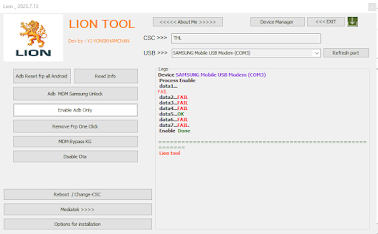
Lion Tool 2023.7.13 For All Samsung Galaxy All Android Supported To Remove FRP One Click By Method Test Mode To Enable ADB Easy bY Code *#0*# And Unlock KG (MDM) Bypass Step by Steps In The Tool By Enable ADB.
Characteristics of The Tool:
Samsung Services:

Characteristics of The Tool:
Samsung Services:
- Read Info.
- Remove FRP One Click (TEST MODE).
- MDM Bypass KG.
- Disable Ota Update.
- ADB MDM SAMSUNG UNLOCK.
- ADB Reset FRP All Android.
- Enable ADB Only (*#0*#).
- Mediatek services Soon.
- Reboot Recovery.
- Reboot.
- Reboot Download Mode.
- Factory Reset.
- Change-CSC.
- Installation Direct Driver Samsung.
- Installation Direct Driver Mediatek.
- Installation Direct Driver Qualcomm.
- Download The Files below the Article.
- Install Samsung USB Driver.
- Extract Files Lion Tool And Open The Tool.
- Remove FRP And Unlock KG:
- Connect Phone With PC (CABLE USB).
- Click On Emergency Call In The Phone Add Code (*#0*#).
- Now Click On Click On Enable ADB Only Or Direct Remove FRP.
- Wait To ADB ON Clik Allow On The Screen Phone.
- Wiat FRP Done Automatic restart The Phone.
- KG Unlock ADB ON Apply the Same Steps In The Tool.
ProgramWirar Extract File 32Bits.
ProgramWirar Extract File 64Bits.
Komentar
Posting Komentar