
How To Download And Install SamFlash V4.1 Latest Tool To Remove Google Account FRP Bypass All Samsung 2024 Method Easy All CPU Supported (Processor) With One Click (Download Mode Or EDL (Qualcomm) Or MTP Mode).
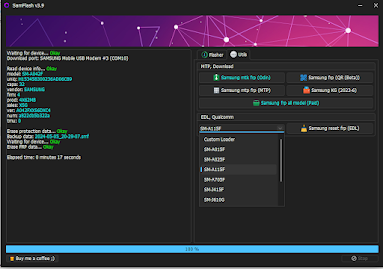
Characteristics of The Tool:
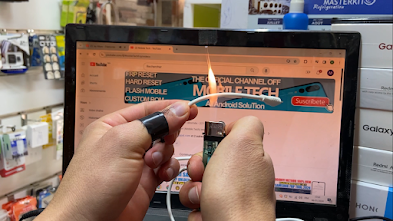
How To Make A Cable:
Bring A new Cable.
Bring A Lighter.
Remove the outer jacket of the cable (Through the lighter).
Different colors are depending on the type of depending on the type of cable, just choose green and black.
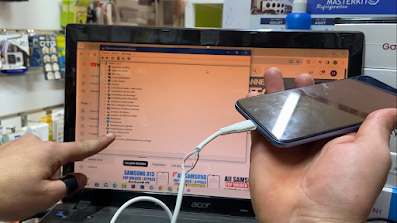
Now How To Enter the Qualcomm Mode.
Power Off The Phone.
Combine black and green together (With your hands only) and click on the Button Volume down.
While holding down the volume button connect the phone to the PC (3Second To 6Seconds) Separate the red and black colors (you will find that the phone has entered Qualcomm mode Edl mode.
.png)
.png)
 SamFlash v4.1
 Added Samsung USA Erase FRP [MTP]

Characteristics of The Tool:
- Remove FRP Samsung Mediatek CPU with One Click.
- Remove FRP Samsung MTP Mode With One Click.
- Remove FRP Samsung EDL Mode With One Click.
- Install Samsung USB Driver.
- Install Mediatek Driver.
- Install USBDK Driver.
- Power Off The Phone.
- Click On the Buttons Volume Down And Volume Up And Connect the Phone With PC (CABLE USB).
- Connect Download Mode.
- Now Click On Samsung MTK FRP ODIN.
- Wait To Complete Finally FRP Done And Easy.
- Connect Phone With PC (Cable USB).
- Click On Emergency Call.
- Add Code Test Mode *#0*#.
- Now Click On Samsung Mtp FRP.
- Wait To Enable ADB Oki on the Screen Phone.
- Click One Allow ADB.
- Finally, FRP is Done And Easy.
- Power Off The Phone.
- Connect Phone With Cable EDL.
- Select Model Phone Or Custom Loader.
How To Make A Cable:
Bring A new Cable.
Bring A Lighter.
Remove the outer jacket of the cable (Through the lighter).
Different colors are depending on the type of depending on the type of cable, just choose green and black.
Now How To Enter the Qualcomm Mode.
Power Off The Phone.
Combine black and green together (With your hands only) and click on the Button Volume down.
While holding down the volume button connect the phone to the PC (3Second To 6Seconds) Separate the red and black colors (you will find that the phone has entered Qualcomm mode Edl mode.
.png)
.png) SamFlash v4.1 Added Samsung USA Erase FRP [MTP]
SamFlash v4.1 Added Samsung USA Erase FRP [MTP] - SM-A037U
- SM-A135U
- SM-A146U
- SM-A505U
- SM-A515U
- SM-G998U
- SM-G996U
- SM-G991U
- SM-G990U
- SM-G986U
- SM-G988U
- SM-S908U
- SM-S901U
- SM-S911U
- SM-S916U
- SM-S918U
- SM-N986U
- SM-N981U
- SM-F926U
- SM-F936U
- SM-F946U
- SM-F711U
- SM-F721U
- SM-F731U
Files:
SamFlash V4.1 NEW (Mediafire).
SamFlash V4.1 (Mega).
Driver+UsbDk+32bit (MediaFire).
SamFlash V4.1 (Mega).
Password Rar = mobiletechfrp
ProgramWirar Extract File 32Bits.
ProgramWirar Extract File 64Bits.
Komentar
Posting Komentar