Langsung ke konten utama

MTK META UTILITY Tool V34 - Samsung FRP Tool 2024

How To Download MTK Utility Tool V34 And How To Open And Remove FRP Samsung 2024 Without Tets Point Mediatek Cpu Without Any Problem Solve All Problems Easy Solution.
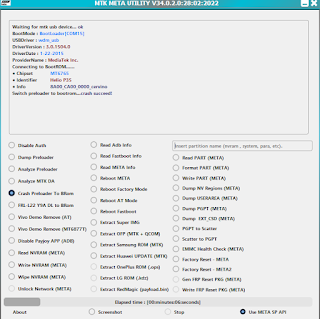

Characteristics of The Tool:
  • Disable Auth.
  • Read Fastboot Info.
  • Dump Preloader.
  • Read PART (AFTER).
  • Read META Info.
  • Format PART (META).
  • Analyze Preloader.
  • Reboot MEΤΑ.
  • Write PART (MΕΤΑ).
  • Analyze MTK DA.
  • Dump NV Regions (META).
  • Reboot Factory Mode.
  • Crash Preloader To Brom.
  • Dump USERAREA (META).
  • Reboot AT Mode.
  • FRL-L22 Y9A DL to BRom.
  • Dump PGPT (AFTER).
  • Reboot Fastboot.
  • Vivo Demo Remove (AT).
  • Dump EXT_CSD (META).
  • Extract Super IMG.
  • PGPT to Scatter.
  • Vivo Demo Remove (MT68771).
  • Extract OFP (MTK + QCOM).
  • Scatter to PGPT.
  • Disable Payjoy APP (ADB).
  • Extract Samsung ROM (MTK).
  • EMMC Health Check (META).
  • Read NVRAM (META).
  • Extract Huawei UPDATE (MTK).
  • Factory Reset - META.
  • Write NVRAM (META).
  • Extract OnePlus ROM (.ops).
  • Factory Reset - METAZ.
  • Wipe NVRAM (META).
  • Extract LG ROM (.kdz).
  • Gen FRP Reset PKG (META).
  • Unlock Network (META).
  • Write FRP Reset PKG (META.
  • Read Adb Info.
  • Extract RedMagic (payload.bin).
How To Remove FRP:
  1. Method Working For Mediatek CPU.
  2. Download The Files Below The Article.
  3. Install Driver Mediatek.
  4. Extract MTK META Utility V34.
  5. Extract MTK Utility Tool V1.
  6. Open The Tool META Utility And Open MTK Utility Tool V1.
  7. Now Connect Phone With PC (Cable USB).
  8. Click On Crash Preloader To BRom (META Utility).
  9. Now Power Off The Phone And Wait for Crash Brom.
  10. Crash BRom Oki Faster Click On Erase FRP Samsung In (MTK Utility Tool V1).
  11. Finally, Wait for FRP Done.
Files:
MTK META UTILITY V34(Mediafire).
MTK UTility Tool V1 (Mediafire).
Driver MTK (Mediafire).
MTK Bader Beta V1 NEW (MediaFire).
Password Rar: mobiletechfrp


Komentar

Postingan populer dari blog ini

GSM TOKYO SAMFRP TOOL V1.0.0 Beta latest Version Download

-  #teenagenolimit download How To Download And Install GSM TOKYO Samsung FRP TOOL V1.0.0 Beta One Click Remove FRP By Test Mode *#0*# Code Or Remove FRP By QR Code Enable ADB Easy 2024 And Remove FRP By Download Mode & Disable OTA Update Oppo, One Plus, Vivo, Xiaomi, Samsung & Factory Reset By MTP Mode One Click. Characteristics of The Tool: Samsung FRP: Read Info. Remove FRP. Enable ADB By Code *#0*#. Enable ADB By QR Code. Remove FRP By Download Mode. Factory Reset. Disable OTA UPDATE: OPPO. ONEPLUS. VIVO. XIAOMI. SAMSUNG. ADB MODE: Reboot. Reboot Bootloader. Enable Diag Pixel. ADB Erase EFS. How To Remove FRP By Code Test Mode (*#0*#): Install Samsung USB Driver. Extract GSM TOKYO SAMFRP And Install The Tool: Open Tool Connect Phone With The PC by CABLE USB. Click On Emergency Call On The Phone Add Code (*#0*#). Now Click Enable ADB In GSM Tokyo. Wiat And Click Allow ADB On The Phone. Finally, FRP Done. How To Remove FRP By QR Code: 1. Tap 3 times on the Language select...

B-GSM MTK TOOL V1.0 Latest Download

How To Download And Install B-GSM MTK TOOL V1.0 Easy Services Off The Tool To Bypass, Unlock, Remove FRP And Pattern Unlock, Screen Lock, Format Data And Save Format Data All Services Mediatek CPU. Characteristics of The Tool: Erase FRP. Factory Reset. Erase FRP Samsung. BootLoader Unlock. BootLoader Relock. Backup NV. Restore NV. Safe Formate Data. Factory Reset old. Redmi 10x Dual IMEI Fix. Redmi 9 Dual IMEI Fix. Redmi 10A Dual IMEI Fix. Redmi 9A Dual IMEI Fix. Android Supported All Mediatek Chipset. Windows Supported WIN 10/11 32/64 Bits. How To Use The Tool: Download The Files below the Article. Extract The Files. Install B-GSM MTK TOOL.EXE. Wait until Installation is Complete. Now Go On the Desktop and Run The App. Files: B-GSM MTK Tool ( MEGA ). Password Rar = mobiletechfrp MTK USB ALL ( MediaFire ). Driver+UsbDk+64bit ( MediaFire ). Driver+UsbDk+32bit ( MediaFire ). Program Wirar Extract File 32Bits . Program Wirar Extract File 64Bits.

Samsung A04e FRP Bypass Android 13 One Click By SP Flash Tool 2024 *#0*# Not Working

How To Bypass Google Account FRP Unlock ON Samsung Galaxy A04e SM-A042F All Serie SM-A042 But All Methods Old Not Working New Method 2024 Solution Easy By SPFlash Tool. Solution Fix Problems: Test Mode (*#0*#) Method Not Working. Package Disable Method Not Working. Talkback Google Assistant Method Not Working. Card Sim Lock Pin Method Not Working. Samsung Cloud Method Not Working (Something Went Wrong). Smart Switch Copy Account Method Not Working. Disable Or Enable the Application Method Not Working. Broom Mode Method Not Working. Method Without TestPoint. How To FRP Unlock: Download the Files below the Article. Extract Files. Install Driver. Open Sp Flash Tool. Add Scatter File Click On Choose (Scatter- Loading-File). Add MT6765 A04e SM-A042F.bin Click On Choose (Download-Agent). Now Click On Format Select Manual Add Adresse Format In File. Now Open MTKSecBootDisable. Click On CrashPL Wait. Power Off The Phone And Connect the Phone to the PC (CABLE USB). CrashPL OKI In MTKSecBootDis...